
What is Corporate?
"Corporate" allows you to add patients to companies, 'Corporations'.
This would be used for instances where you need to bill a Company/Govt Agency later for payment, i.e Free Worker Safety Spectacles, outsourced NHS work.
Whether they just get help towards the cost of the eye care or have everything paid for them, Corporate allows Reporting of amounts for re-imbursement later.
Transactions will show Part or Whole payments of the Balance with name of Corporation below the Items bought.
Reports can then be produced for billing of Corporation afterwards.
(Note - There is a Loyalty Plan Option within Nova - money off applied for Patient on a scheme.)
Setting Up Corporation Details
Press the New button on the Corporate screen. Note the Update button brings up the same window (albeit with details to amend, not start afresh).
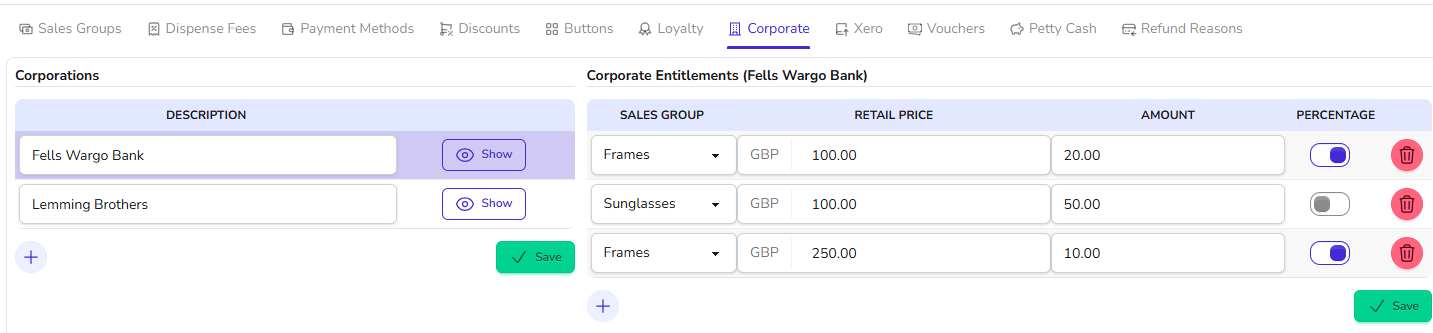
On the Left is name of Corporation, and the right is the Details of the Highlighted Corporation (Fells Wargo Bank).
Entitlements can be entered, with the first column being a drop down of the relevant Sales Groups
and then fill in Amount column using the Percentage Column to decide if it is a Percentage or fixed amount.
In the example above:
- Frames up to and including £100.00 get a discount of 20%. (Note - this 10% is for the full amount - it is not banded)
- Frames up to £250 will get a 10% Discount.
- FIXED amount off - Sunglasses are set as £50 towards the cost, up to £100 price.
Further Example -
where the Corporation pays for their Glasses i.e. Safety Spectacles. Setting Amount at 100 as a percentage% would mean Free, and this is on Frames, up to the £1000 Retail Price.
Adding a Patient to Corporation
To do this, click Update on a Patient Record.
Scroll down slightly to see Corporation and Loyalty ;
Click onto the Button to the right to Assign to a Corporation from the choices in the Pop-up window.
and then 'Select' below to confirm. Press Save to confirm the changes to Patient.
To Remove a Patient - reverse this process.
What is seen on Transaction Screen
Example - Frame bought by Patient who is a Fireman, the Balance is cleared and 'Fire Service' is shown.
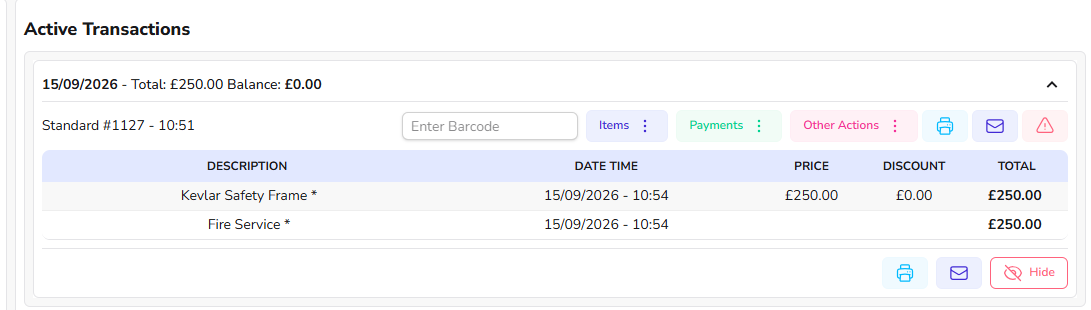
you can then produce Reports of these 'Payments' - see below.
Reporting of Corporate Payments
Go to Menu > Reports > Transactions - these will show for Payments Reports
The best Report, to specify Patient names and amounts is :-

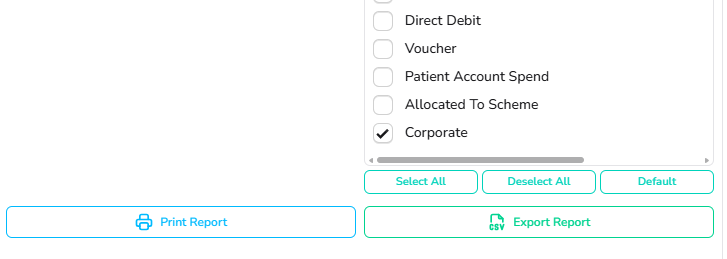
To get a listing of just Corporate, on the Right hand side at the bottom,
firstly "DeSelect all",
then make sure to Select 'Corporate'
For any further help, call Optinet Support - 0800 3102400 or email us at support@optinetuk.com